
An appliance repair website has one job: get a homeowner with a dead fridge to call you in under ten seconds. That means a phone-first layout, a tap-to-call number, a clear service area and a plain explanation of what a service call costs. We build sites that way for local service trades, and we show you the finished site before you pay. Built first, paid after.
This is for owners of appliance repair shops and other local service businesses who want a site that works on a phone. Below is what to put on it, what to leave off, and how to tell if it is working.
TL;DR
- Your customer is on a phone, stressed, with a broken machine. Design for that person first.
- Put a tap-to-call number, your service area and your availability at the top of the homepage.
- Build one page per appliance and one per city you serve. Do not copy the same page 20 times.
- Spell out your diagnostic fee and your warranty. Vague promises lose calls.
- Match your Google Business Profile to your site. Both drive local calls.
Table of Contents
- Who calls an appliance repair company, and when
- What the homepage has to do in the first screen
- Design for the phone first, then the desktop
- Pages an appliance repair site needs
- Features that make people contact you
- How your website and Google Business Profile work together
- A worked example
- How to tell if your site is working
- Perspective
- What we do for appliance repair shops
- Common mistakes to avoid
- FAQ
- Sources
Who calls an appliance repair company, and when
Nobody browses for appliance repair. The dryer quit mid-cycle. The fridge is warm. There is water on the kitchen floor. The person searching wants three things: do you fix my machine, do you come to my area, and can you come soon.
They search on a phone, often standing in the kitchen. They open two or three results and call the first one that answers those three questions. If your site makes them pinch, zoom, scroll or hunt for a number, they hit back and call the next shop.
That is the whole design brief. Everything else is detail.
What the homepage has to do in the first screen
The first screen on a phone, before any scrolling, needs five things:
- What you fix. "Appliance repair" is fine. "Washer, dryer, fridge and oven repair" is better.
- Where you work. Name the cities. "Serving Pasadena, Glendale, Burbank and the San Gabriel Valley" beats "serving your area."
- When you can come. If you offer same-day or next-day service, say so in the headline area. If you do not, say how fast you usually get out.
- A phone number that taps. One touch should start the call. Plain text that has to be copied is a lost job.
- A way to request a visit for people who will not call at 9 p.m. A short form: name, phone, appliance, problem, ZIP.
Keep the top bar simple. Logo, phone number, one button. Skip the menu with eight items and the rotating slideshow. A photo of your actual tech and van does more than stock photos of a smiling family.
Skip the clutter
We see the same mistakes on service sites all the time. Big auto-playing banners. Pop-ups that cover the phone number. A chat widget that sits on top of the call button. A contact form with 12 required fields. Each one adds friction when the customer has no patience.
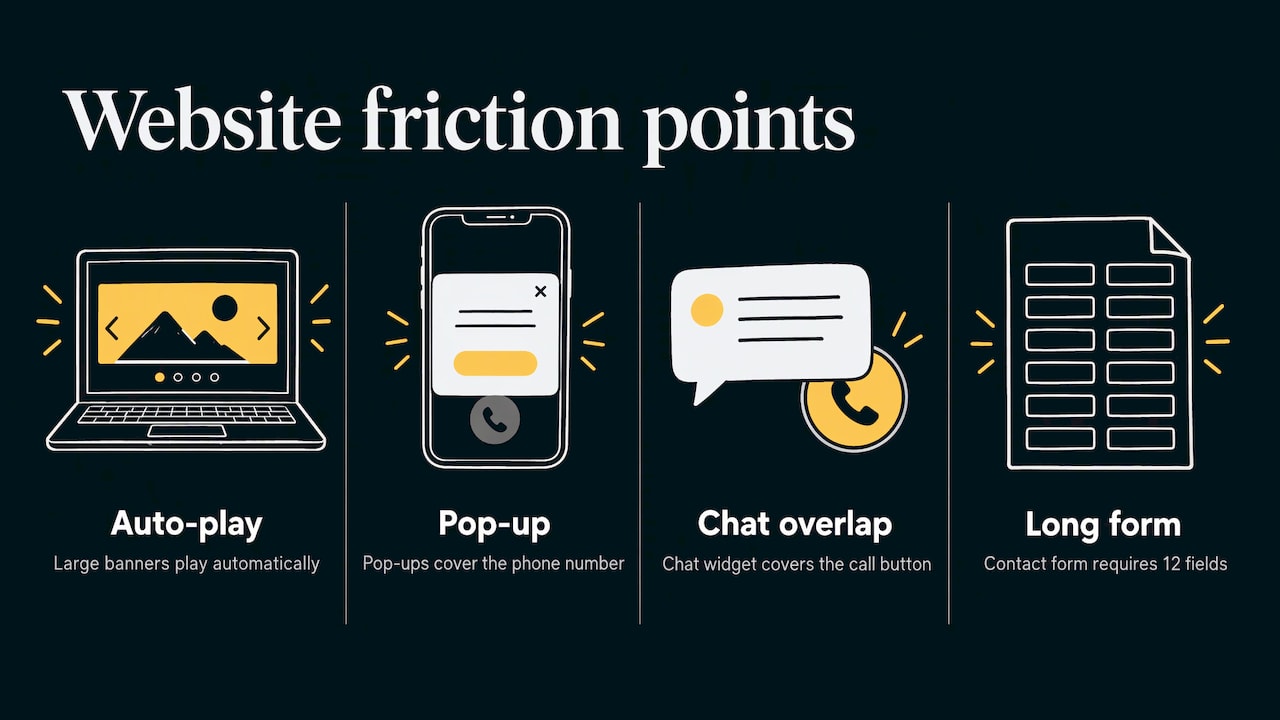
This is our opinion from building trade sites, not a lab study. But the logic is simple: every extra tap between the customer and your phone is a chance to lose them.
Design for the phone first, then the desktop
Most of your customers will see the phone version. So design that version first, then let it stretch to a laptop. That is what mobile-first means. Many older sites do it backwards: they shrink a desktop page and hope.
A phone-first appliance repair site should have:
- A sticky call button. It stays on screen as the customer scrolls. They can call from the bottom of the page without scrolling back up.
- Big tap targets. Buttons and links sized for a thumb, with space between them.
- Short paragraphs and big text. No one reads a wall of text on a phone with a broken washer behind them.
- Fast loading. Compress photos. Skip heavy video at the top. A slow page loses the customer before they see your number.
- Hours that make sense. If you answer calls until 7 p.m. and take voicemail after, say that.
Test it yourself. Pull up your site on your own phone, on cell data, not Wi-Fi. Try to call yourself in two taps. If you cannot, a customer cannot either.
Pages an appliance repair site needs
A one-page site with a phone number is better than nothing. A real site has more, because each page can show up in search for a different job.
One page per appliance
Create a page for each appliance you repair: refrigerator, washer, dryer, dishwasher, oven, range, microwave, garbage disposal, ice maker. On each page, cover:
- The common problems (fridge not cooling, washer not draining, dryer not heating, dishwasher leaking)
- The brands you work on
- What happens on a service call
- A phone number and a short form near the top
Write it the way you would explain it to a customer at the door. Real symptoms, real brands, real answers. A homeowner who types "Samsung washer won't drain" wants to see you know that machine.
One page per service area
If you cover several cities, give each major one its own page. Be careful here. Pages that swap only the city name look fake and add nothing. Each one needs something real: the neighborhoods you serve, the kind of homes there, how fast you usually reach that area, a job you did nearby (described generically, with no customer names unless they agree).
We go deeper on this in our guide to service area business SEO.
A service call page
People hate surprise bills. A page that explains how a call works builds trust before the phone rings. Cover:
- What the diagnostic fee is and whether it applies to the repair
- How parts are ordered and how long that usually takes
- How labor is priced (flat rate, hourly, by the job)
- What you do when a repair is not worth it
If you publish your numbers, put them in dollars. If your prices vary a lot, give a clear starting point for the diagnostic visit and say what changes the final bill.
Warranty and trust
"We stand behind our work" means nothing. A specific line does: how many days of labor warranty you give, and that manufacturer warranties apply to parts. Put your license number in text where your state requires one or you hold one, and list your insurance if you carry it. Add real photos of your team and truck. Add real reviews, with the customer's permission, never made-up ones.
Features that make people contact you
The contact options should match how people actually reach out:
| Feature | Why it matters | Where it goes |
|---|---|---|
| Tap-to-call button | One touch starts the call | Top bar, hero, sticky footer |
| Short request form | Catches people who will not call | Hero and bottom of each page |
| Text option | Some customers prefer it | Next to the phone number, if you answer texts |
| Online booking | Lets people pick a slot at night | Only if you can honor the slots |
| Service area list | Answers "do you come to me" fast | Homepage and footer |
| Hours and availability | Sets expectations | Top of page |
Do not add a feature you cannot run. If the form goes to an inbox nobody checks, it hurts you. A request that waits two days for a reply is worse than no form. Pick the tools you will actually answer, and answer them fast.
How your website and Google Business Profile work together
Most local customers find a repair shop through the map results and the Google Business Profile, the free listing that shows your name, hours, reviews and phone number on Google. Your website backs it up.
Google says local results are ranked mainly on relevance, distance and prominence. Google also says you can help your ranking by verifying your profile, keeping your address, hours, category and details complete and accurate, replying to reviews, and adding photos and videos.
For a repair shop, that means:
- Same name, address and phone number everywhere. On your site, your profile and your directory listings. Mismatches confuse customers and search engines.
- The right categories. Pick the one that fits what you do most.
- Your website link on the profile, pointing to a page that answers the search.
- A steady habit of asking for reviews right after a job, when the customer is happy their machine runs.
- Real photos of your work, your van and your team.
We cover setup in detail in Google Business Profile for contractors. If you want help bringing the profile and the site together, SEO built for trade contractors' local search covers the same ground from the marketing side.
More general advice for trades is in our home service website design guide, and the same principles apply from plumbing to local SEO for contractors.
A worked example
Here is a made-up shop, so you can picture the layout. It is fictional, not a client.
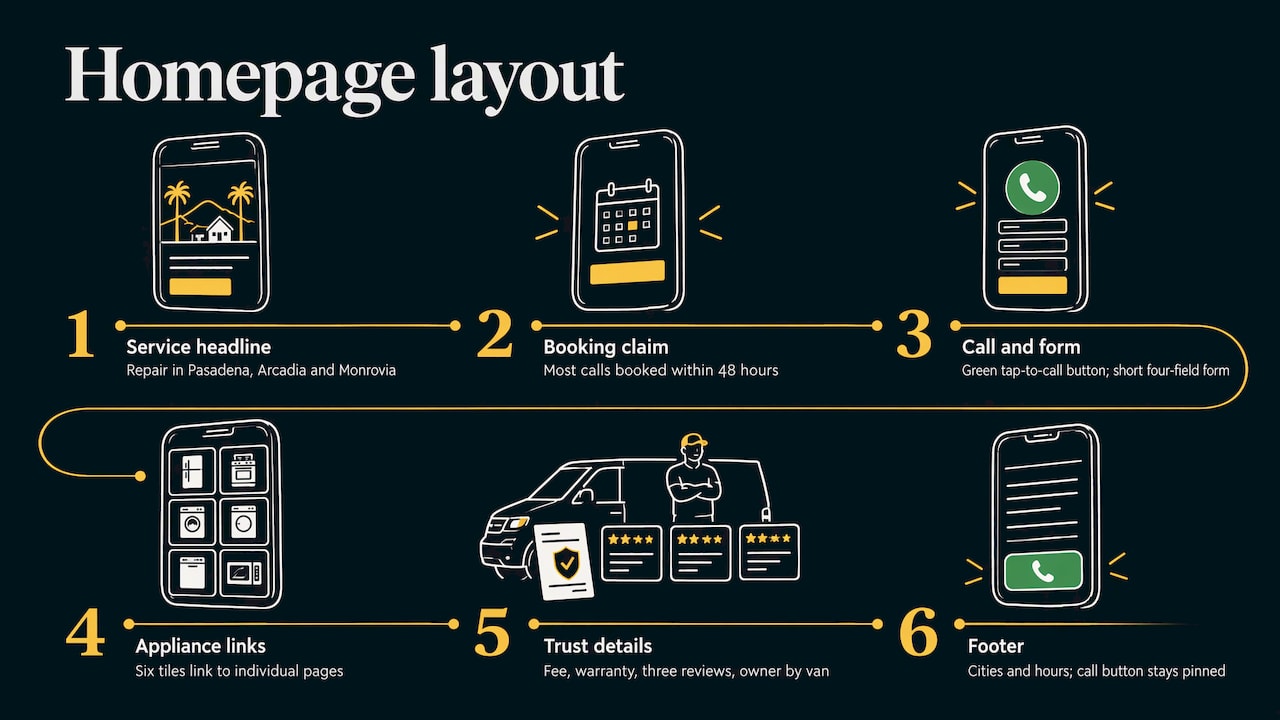
Say a one-van shop in the San Gabriel Valley called Valley Appliance Fix. The phone version of the homepage opens with the headline "Appliance repair in Pasadena, Arcadia and Monrovia." Under it: "Most calls booked within 48 hours." Below that is a green tap-to-call button and a short form with four fields.
Scrolling down: six appliance tiles, each linking to its own page. Then a short line on the diagnostic fee and the labor warranty. Then three real reviews and a photo of the owner by the van. At the bottom: the cities served and a hours block. A call button stays pinned to the screen the whole way.
That is the entire homepage. It loads fast, it answers the three questions, and a customer can call from any point on the page. Nothing in it needs fancy tech. It needs someone to decide what matters and cut the rest.
How to tell if your site is working
Do not guess. Check these:
- Phone calls from the site. Track calls from the website number or the call button. Ask new customers how they found you.
- Form requests. Count them weekly.
- Google Business Profile activity. The dashboard shows calls, website visits and direction requests.
- Search Console. It shows which searches bring people to your site.
- Your own phone test. Load the site on cell data. Time how long it takes to start a call.
If people visit but nobody calls, the page is not answering the three questions. If nobody visits, work on your profile, your pages and your reviews. A site that sits at the bottom of search needs local SEO, not a new logo.
Perspective
Most appliance repair owners we talk to have the same problem. They are great with a multimeter and a nut driver, and their website was built years ago by a cousin, a template, or an agency that disappeared. The site works on a desktop. On a phone, it is a mess.
We build the opposite. Phone first, one clear number, pages that match how people search. We also think you should not have to guess. That is why we show you a live demo of your site within 24 hours, before any commitment. You see it, tap it, call the number on it. Built first, paid after.
Our pricing is agreed upfront. There are no long-term contracts. You own your site assets. You talk to the person building it, not a ticket queue. For a one- or two-van shop, that is the difference between a site you trust and a site you forgot about.
M Mo
What we do for appliance repair shops
We design mobile-first websites for service businesses, and we also handle the pieces around the site: local SEO, Google Business Profile setup and management, and search optimization for AI answers. You get a free live demo of your site in 24 hours, with pricing agreed in advance and no contract.
After launch, our optional care plans keep the site current: Keep is $297 per month, Grow is $397 per month and Signature is $597 per month. Details are on the pricing page. You can see how we build a custom website for your business, or look at the Google profile service if your listing is the first thing to fix.

If your phone is not ringing like it should, the fastest way to see the difference is to look at a finished page with your name on it.
Common mistakes to avoid
- No city names. "Serving your area" tells Google and customers nothing.
- One page for every appliance. A single "services" page cannot rank for fridge, washer and dryer repair at once.
- Stock photos only. Real work builds more trust than a fake smile.
- Hidden pricing logic. You do not need every price, but explain how billing works.
- A form that goes nowhere. Answer every request fast.
- Copy-pasted city pages. Thin duplicates add nothing.
- An old site that does not load on phones. It costs you calls every day.
FAQ
How many pages does an appliance repair website need?
Start with a homepage, one page per appliance you fix, one page for your service call process, a contact page and pages for your main cities. For a small shop that can be 10 to 20 pages. That is our estimate, not a rule. Add pages only when you have something real to say on each.
Should I list prices on my site?
Explain how pricing works, at minimum: the diagnostic fee, how labor is charged and how parts are handled. If you can show a clear starting price, do it. Customers who know the cost before they call are easier to book, and they waste less of your time.
Do I need online booking?
Not on day one. A tap-to-call button and a short request form cover most customers. Add online booking when you can keep the calendar accurate. A slot you cannot honor hurts more than no slot.
How fast can I get a new site?
We put up a free live demo of your site within 24 hours, so you see it before you commit. The full build depends on the scope, and the price is agreed in advance. Check the pricing page for the plans.
Sources
Get a free live demo of your new site in 24 hours at nocturne.design.