
Your Google Business Profile is the listing that shows up when a homeowner searches "plumber near me" and taps a call button. It's free. It takes an afternoon to set up right. And a wrong category or a hidden-wrong address can keep you off the map for months. This guide walks you through it in order. If you'd rather hand it off, we set up and manage contractor profiles at Nocturne.
TL;DR
- A Google Business Profile is a free listing that controls how you look on Google Search and Maps. Contractors who travel to customers qualify.
- If you work at customers' homes, hide your street address and list service areas instead. Up to 20 areas.
- Pick one primary category that matches your main trade. Add secondary ones only if you really do that work.
- Fill out everything: hours, services, photos, website, phone. Then keep it current.
- Ask every customer for a review. Never pay for them, never pick and choose who you ask.
Table of Contents
- What a Google Business Profile does for a contractor
- Are you eligible?
- Address and service areas
- Create or claim your profile
- Verification
- Categories: the one choice that matters most
- Fill in everything else
- Reviews: get them honestly
- Common mistakes we'd fix first
- What the profile can't do
- Perspective
- What we do about it
- FAQ
- Sources
What a Google Business Profile does for a contractor
It's the box on the right of a Google search and the card on Google Maps. It shows your name, phone number, hours, website, reviews and photos. Google describes it as a free tool to manage how your business shows up on Maps and Search. It covers businesses that deal with customers in person, including service providers who visit customers.
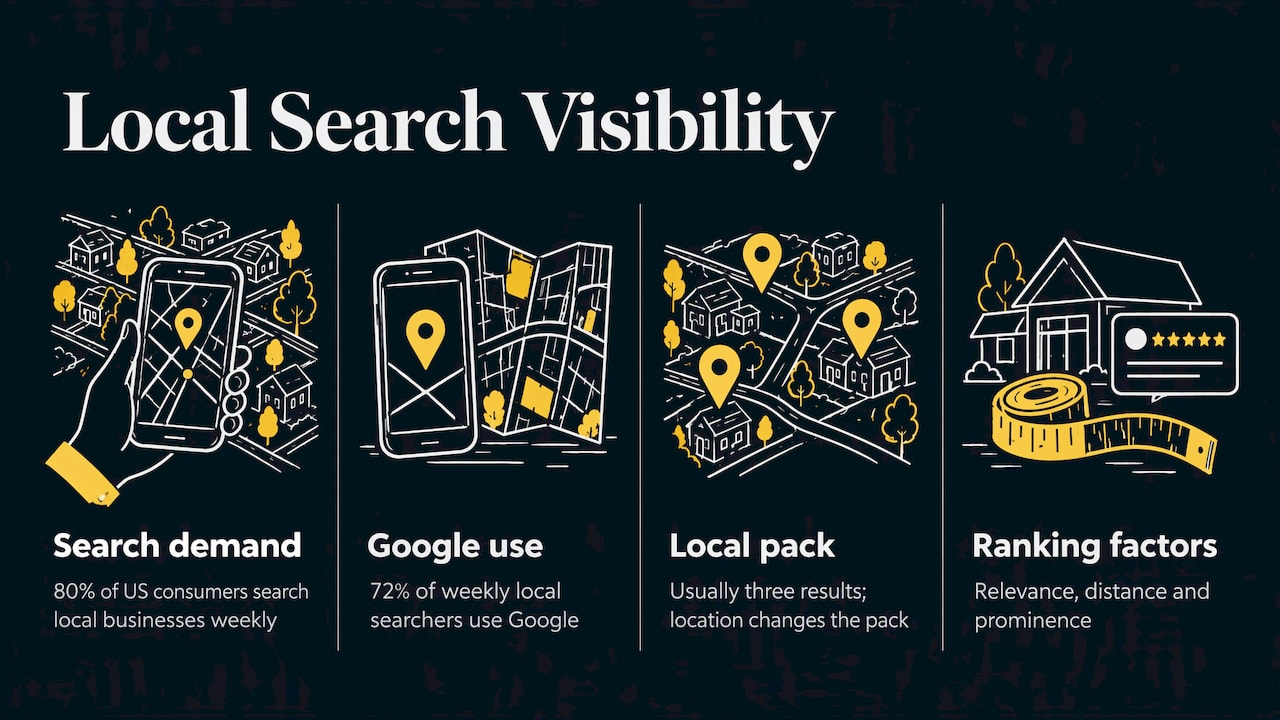
Why care? Search Engine Land's guide cites figures that about 80% of US consumers search online for local businesses every week, and 72% of them use Google. A homeowner with a burst pipe or a dead AC doesn't browse. They search, look at the top three, and call one.
That top-three box is the local pack. Search Engine Land explains that it most often shows three results, and that results change with where the searcher is standing. So nobody owns a permanent number one. A roofer in Pasadena and a roofer in Irvine see different maps for the same search.
What Google weighs: relevance, distance and prominence. You can't change distance. You can change relevance (categories, services, complete details) and prominence (reviews, links, a solid website).
Are you eligible?
Most contractors are. Google's guidelines say a business qualifies if it has a location customers can visit, or if it travels to customers. That second case is you.
The things that get people rejected:
- P.O. boxes and mailbox stores. Not accepted as an address.
- Virtual offices. Not eligible.
- Lead-generation businesses. Not eligible. You have to be the one doing the work.
Google splits businesses into types. A service-area business visits or delivers to customers and doesn't serve them at its own address. A plumber is Google's own example. A hybrid business does both, like an auto shop that also runs roadside assistance. If customers never come to your shop, you're service-area. If they walk in too, you're hybrid.
Address and service areas
This is where contractors trip. Here's the rule for a service-area business, per Google's guidelines: hide your address from customers and keep one profile for your central office, with a designated service area. One profile. Not one per city.
Why hide it? If you run the business out of your house in Riverside, you don't want strangers pulling up to your driveway. Your listing then shows the areas you serve instead of a street.
Google's service-area page sets the limits:
- Up to 20 service areas.
- Set them by city, postal code or other area. Radius isn't allowed.
- Keep the whole area within about 2 hours' driving time of your base.
- Approved edits can take up to 48 hours to show.
A fictional example. Say an HVAC company based in Ontario, California covers Ontario, Rancho Cucamonga, Fontana, Upland, Chino and Pomona. That's six areas, all close, all real. Listing 20 cities across three counties just to look big is a good way to get flagged and a bad way to rank. Pick where you actually send trucks.
Don't open extra profiles for the same business in the same metro area to "cover more ground." Google's rules say one profile for the central location. Duplicates are a headache you don't need.
Create or claim your profile
You need a Google Account. Then, per Google's get-started page, you create or claim the profile, verify it, and manage the info.
Search your business name first. Someone, or Google itself, may have already made a listing. If so, claim it. Don't create a second one.
Then enter, in this order:
- Exact business name, the one on your truck and your license. No keywords stuffed in.
- Your category (more below).
- Address, then hide it if you're service-area.
- Service areas.
- Phone and website.
One trap: use a real phone number that rings to a person or voicemail you can get to. Verification codes can be sent by call or text, and an automated menu can't punch in a code.
Verification
Unverified profiles don't show up properly. Google picks which methods you're offered. Video is the one to look for. Google's video verification page works for service-area businesses, and the rules are tight:
- Live and unedited. At least 30 seconds. Recorded on a mobile device.
- Show where you are: street signs or landmarks.
- Show that the business exists: tools, equipment, branded shirts or a branded van.
- Show you run it: do a service, unlock the van, or show a permit, invoice or utility bill with the profile name.
Review takes up to 5 business days. Shoot it in one take, wearing your branded gear, with the van behind you. Don't film from the couch.
If you get a postcard instead, don't touch the name, address or category while you wait. Changing things can restart the clock.
Categories: the one choice that matters most
Search Engine Land advises one primary category that best describes the business, plus up to nine additional. Be specific. "Roofing contractor" beats "General contractor." "Plumber" beats "Contractor."
Here's the logic. When someone searches "water heater repair," Google looks for businesses whose category says so. A vague category is a vague signal. Pick the work that pays your bills as primary. Use secondary categories for real side services, like a plumber adding "Water heater installation service" or "Drain cleaning service." Don't add a category for work you don't do.
We wrote a full guide to picking categories if you want the long version.
Fill in everything else
A half-empty profile loses to a full one. Google's own data, reported by Search Engine Land, says complete profiles get seven times more clicks on listing features, and regularly updated ones get five times more views. Check the numbers against that source before you quote them to anyone.
Your checklist:
- Hours. Accurate, including holidays. If you do emergency calls, say so in your hours and description.
- Description. Plain language. What you do, where, for whom. No hype.
- Services. List every job you take: repipes, mini-splits, tear-offs, tile.
- Website. Link to a page that loads fast on a phone and has your number at the top. Most of your profile traffic is on a phone.
- Photos. Search Engine Land recommends company vehicles, uniformed staff and before-and-after shots for service-area businesses. The same guide cites Google data that photos drive 42% more direction requests and 35% more website clicks.
Photos work best when they're real jobs. Snap the before, snap the after, same angle. If you want those pictures organized with time and location on them, a job-site photo tracking app can keep the records straight.
Posts and updates
Google Posts are short updates that appear on your profile. Search Engine Land suggests posting weekly with a call to action. Post a finished job, a seasonal tip (swamp cooler checks in the Inland Empire, gutter cleaning before the rains), or a limited offer. A Google Business post planner helps you line up a few weeks ahead so the profile doesn't go quiet.
Reviews: get them honestly
Search Engine Land's contractor SEO guide says Google uses review count and rating when ranking local results. Reviews also decide who gets the call once they're looking at three options.
The routine:
- Grab your review link from your profile.
- Text it to every customer when the job's done. Every one, not just the happy ones. Selective asking breaks Google's rules.
- Reply to every review, good and bad. Short, polite, factual.
- If the same complaint shows up twice, fix the problem on the job, not in the reply.
Never buy reviews. Never write your own. The FTC's rule on fake reviews was announced in 2024 and bans buying or selling fake reviews. Google also tightens review policy regularly, so read its current review policy before you set up any ask-for-review script that pushes customers.
More on this in our guide to getting more Google reviews without begging.
Common mistakes we'd fix first
- Generic category. "General contractor" on a roofing company.
- Home address showing. Or worse, a P.O. box.
- Name mismatch. The profile says one thing, the website says another, a directory says a third. Keep your name, address and phone number identical everywhere. Search Engine Land notes even small differences like "ave" versus "avenue" can hurt.
- Dead website. The profile sends people to a slow, desktop-only page. They bounce and call the next guy.
- No updates. Old hours, old photos, no posts.
- Ignored reviews. Unanswered complaints sit there like a bad sign on your shop door.
What the profile can't do
It doesn't guarantee a spot in the top three. Nobody can sell you that, and Google says you can't pay for a better local ranking. What it does is give you the best shot at being found by people searching near you. Your website still matters, because Google looks at the page your profile links to. For the broader picture, see our guides on ranking higher on Google Maps and local search ranking factors.
Perspective
Most contractors we talk to treat the profile like a phone book entry. Set it once, forget it. Then they wonder why the phone's quiet.
Here's how we see it. The profile and the website are one system. Someone finds you on Maps, taps through to your site, and decides in seconds. If the profile is sharp and the site is slow, you lose the call. If the site is sharp and the profile is thin, they never get there.
That's why we build phone-first sites and handle Google profiles under the same roof. You get one team that knows both halves. And you get direct access to the builder, not a ticket queue.
Built first, paid after. We show you a live demo of your site in 24 hours, with pricing agreed up front and no long-term contract. You see it before you commit.
M Mo
What we do about it
We build mobile-first websites for plumbers, HVAC companies, roofers and other service businesses, and we set up and manage Google Business Profiles. You can see the profile work on our Google profile page. Prefer to start with the site? Look at our website service.
Ongoing care plans are listed on our pricing page: Keep is $297 per month, Grow is $397 per month, and Signature is $597 per month. Pricing is agreed in advance, and you own your site assets.

Want to see what your site could look like before you spend a dime? Ask for the free demo.
FAQ
Do I need an LLC for a Google Business Profile?
Google's eligibility rules are about whether you have a location customers can visit or you travel to customers. They don't say you need a particular legal structure. You do need to be a real business with a real name that matches what's on your truck, license and website. Talk to your accountant about the right entity for taxes and liability.
Is it worth having a Google Business Profile?
Yes. It's free, per Google, and it's the listing people see first when they search for local services. Search Engine Land's guide cites data that about 72% of US consumers who search for local businesses use Google. Skipping it means handing those calls to whoever has one.
Can I hide my home address?
Yes. If you serve customers at their location, Google tells service-area businesses to hide the address and show service areas instead. You'll still verify with your real address or by video.
How long does verification take?
Video verification review takes up to 5 business days, according to Google. Postcards take longer. Google chooses which methods you see, so check your profile for the options offered.
How many cities can I list?
Up to 20 service areas, by city or postal code, and the whole area should stay within about 2 hours' driving time from your base. Radius isn't allowed.
Get a free live demo of your new site in 24 hours at nocturne.design.
Sources
- Get started with Google Business Profile
- Guidelines for representing your business on Google
- Manage your service areas
- Business Profile for service businesses overview
- Verify your business with a video recording
- How to set up and optimize your Google Business Profile
- Google Business Profile Playbooks
- What Is Local SEO?
- How to do SEO for contractors
- FTC final rule banning fake reviews