
Your HVAC leads online come from three places: a website that works on a phone, a Google profile that shows up in the map results, and a fast answer when the phone rings. Buy leads from a shared lead service and you rent customers other contractors are also calling. Build those three and you own the pipeline. We build phone-first sites for trades, and we show you a live demo of yours within 24 hours, so you see it before you pay. Built first, paid after.
TL;DR
- An HVAC lead is anyone who calls, fills out a form or books online. Your site, your Google profile and your call handling decide how many you get.
- Most customers find you on a phone. Fast load, a tap-to-call button and a booking option beat a pretty homepage.
- Paid leads and ads work, but you pay again for every one. A site and profile you own keep working.
- Fix what happens to leads you already get before you pay for more.
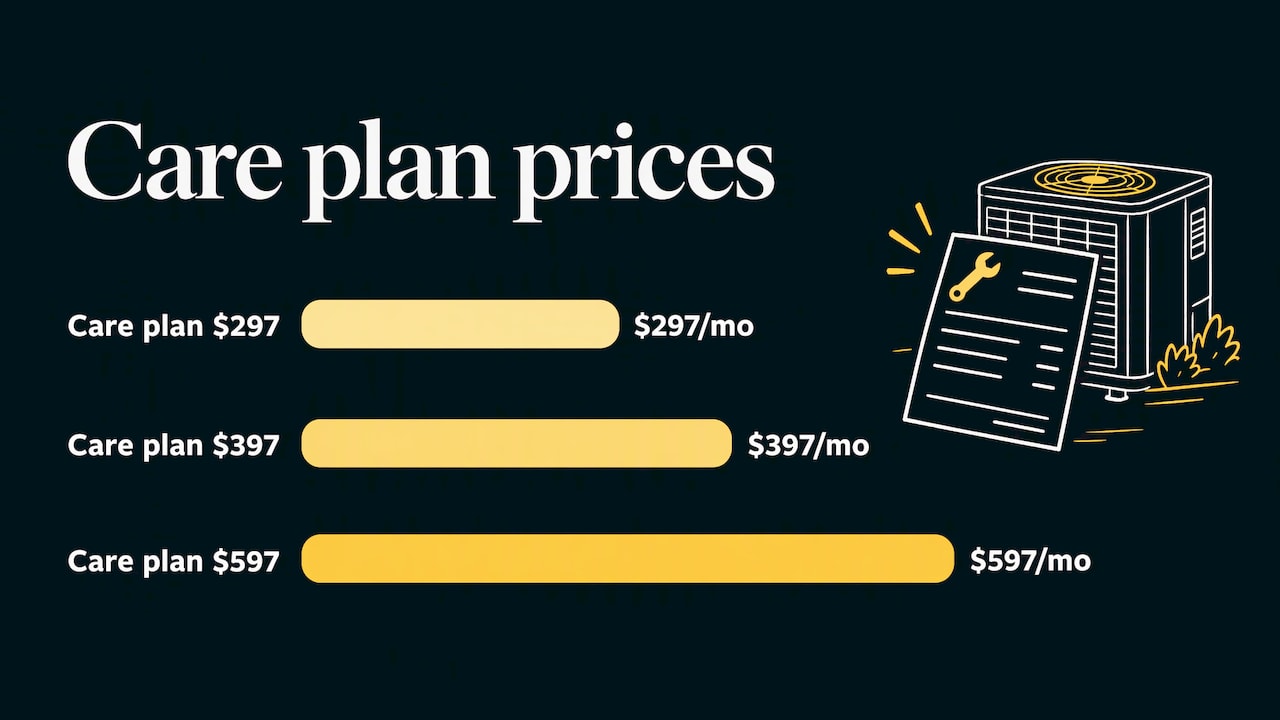
- Nocturne plans run $297, $397 or $597 a month for ongoing care. No long-term contract.
Table of Contents
- What counts as an HVAC lead online
- The four places HVAC leads come from
- Your website is the lead machine
- Online booking: the gap most HVAC sites leave open
- Get found on Google before the heat wave
- Answer the phone or lose the job
- What a lead costs, and what it's worth
- Show up in AI answers too
- Perspective
- A simple 30-day plan
- Get a site that catches the leads
- FAQ
- Sources
What counts as an HVAC lead online
A lead is a person who needs heating or cooling work and reaches out. A lead is anyone interested in installation, repair, maintenance or advice who contacts you by form, call or email. That's it.
Not every lead is worth your time. A good one has a job you can handle, lives in your service area and can realistically book. A homeowner in Riverside with a dead condenser in July is a good lead. Someone two counties away asking for a free quote on a window unit is not.
So you want two things: more of the good ones, and a clean way to catch them. Most contractors only work on the first.
The four places HVAC leads come from
Here's the plain list. Every online lead you get lands in one of these.
| Source | How you pay | You own it? |
|---|---|---|
| Your website | One build, then optional upkeep | Yes |
| Google Business Profile and map results | Time, reviews | Yes |
| Pay-per-lead and ad platforms | Every lead or click | No |
| Referrals and repeat customers | Good work | Yes |
The shared lead sites charge you per lead and sell the same inquiry to other contractors in your area. Local Services Ads work differently: they sit at the top of Google, show your rating and a Google Guaranteed badge, and charge when a customer contacts you. Both can fill a slow week. Neither builds anything you keep.
That's why we put the site and profile first. They keep working after you stop paying anyone.
Your website is the lead machine
People search "AC repair near me" on a phone, usually hot, usually in a hurry. They hit two or three results and call the first one that looks real and loads fast.
Mobile devices account for roughly 60% of global web traffic, and mobile users expect pages to load in three seconds or less, easy tapping and an instant "Call Now" or "Request Service" button. If your site was built for a desktop in 2016, you're losing those calls.
What a phone-first HVAC site needs:
- A call button that stays on screen. One tap, no scrolling.
- Fast load. Heavy images and slider banners kill it.
- Service pages by job. AC repair, furnace install, heat pump, duct work. One page each.
- Service areas by city. Name the real towns you work in. Pasadena, Ontario, Temecula, Long Beach.
- Real photos and licensing info. Your crew and your trucks, not stock photos.
- A booking or estimate option for people who won't call.
We go deeper on page structure in our guide to HVAC website pages and features that book jobs. If you want it built for you, our website service is a mobile-first custom build. You get the live demo first. Built first, paid after.
Online booking: the gap most HVAC sites leave open
Some customers won't call. It's 10 p.m., the house is 88 degrees, and they'd rather click a time than sit on hold tomorrow morning.
Most HVAC sites don't give them that option. One scan of 4,550 US home-services websites found 30.4% of 1,363 HVAC sites could take an online booking. Another 32.5% invited a booking or estimate request with no scheduling system behind it. That's a button that promises something the business can't deliver on the spot.
A booking option does not need to be fancy. Customers should be able to:
- Pick the problem: no cooling, no heat, tune-up, new system
- Enter their address or ZIP so you can confirm you serve it
- Choose a time window or request a callback
- Mark an emergency
Then make sure someone actually sees the request. A form that lands in a dead inbox is worse than no form.
Get found on Google before the heat wave
When someone types "HVAC near me," Google's map results show first. Those three listings get most of the calls. You get in by having a complete Google Business Profile, the right primary category, good reviews and a site that backs it up.
Google ranks local results on relevance, distance and prominence. Prominence includes how many reviews you have and how many sites link to you. Same source: 97% of consumers read reviews online and 74% look for ones written in the last three months, per BrightLocal's 2026 survey.
What that means for you:
- Ask for a review after every job. Send a direct link by text before the tech leaves the driveway.
- Reply to every review. Good and bad.
- Don't offer discounts or gifts for reviews. Google's policies prohibit incentives.
- Keep hours, services and service area current. Update before the summer rush, not during it.
- Pick the right primary category. It's the biggest map-pack factor in Whitespark's 2026 ranking study.
We lay out the full setup in Google Business Profile for contractors and the search side in HVAC SEO. If you'd rather hand it off, our Google profile service covers setup and management, and our Google search service covers local SEO.
Answer the phone or lose the job
This is where contractors burn the most money. You pay for the lead or the site, the call comes in, and nobody picks up.
A CallRail survey of 1,000 US consumers found 82% would call a competitor if a business didn't answer, and only 42% leave a voicemail. Treat a missed call as a lost job, because it usually is.
Fix it in this order:
- Forward the business line to a cell that someone actually carries.
- Set a text-back for missed calls.
- Check your web forms every day, and answer within minutes in peak season.
- If you're on a roof or under a house all day, consider an AI receptionist that answers calls and books appointments so no inquiry sits waiting.
One more point from the data. Analyst Jon Torrey looked at 22,000+ Google PPC HVAC leads and found that only 28% of form leads matched to new opportunities in the CRM, leaving 1,146 forms that never became tracked work. His advice: improve what happens to the leads you already have before buying more.
What a lead costs, and what it's worth
Know your numbers. Otherwise you can't tell a good channel from a bad one.
In that same 22,000-lead dataset, covering November 2021 to June 2022, 21% of leads turned into sold or closed jobs, with a cost of $391.17 per booked job and a $4,637.77 average ticket. New customers made up 62% of revenue, with an average ticket of $5,962.17 against $3,385.57 for existing customers. That's one company set's paid-search data from a few years back. Your costs will differ.
Track three numbers per month:
- Leads in: calls, forms and bookings, by source
- Leads booked: how many became appointments
- Cost per booked job: total spend on the channel divided by booked jobs
Here's a worked example, and it's an estimate, not a result. Say a shared lead service costs you $2,000 in a month and books 10 jobs. That's $200 per booked job, and next month you pay again. Now say a site and profile cost you a fixed monthly fee and bring in calls whether or not you spend on ads. The math improves every month the site keeps ranking, because there's no per-lead meter running.
For reference, our care plans are published at $297, $397 and $597 a month. Compare that to what you spend on leads you don't own.
Show up in AI answers too
Homeowners now ask AI tools things like "who's a good AC company in Anaheim." Those tools pull from sites and profiles that state clearly what you do and where. A clean site with service pages, city pages and consistent business info helps there as well as in Google.
We handle this under AI search (AEO and GEO). If you want to understand how AI search visibility gets tracked against others in your market, this overview of AI search optimization shows what that work involves.
Perspective
We build sites for plumbers, HVAC crews, roofers and other trades. The same problem shows up over and over: the work is good and the website isn't.
A contractor pays for leads, sends a few thousand dollars to ad platforms, and still has a site that loads slow on a phone and hides the phone number. That's money poured into a leaky bucket.
Our view is simple. Fix the bucket first. A fast, phone-first site, a complete Google profile and a way to book online. Then add ads if you want more volume.
That's also why we show you the site before you pay. You look at a live demo within 24 hours. No contract. Pricing agreed up front. You talk straight to the person building it. You keep the site assets. Built first, paid after.
M Mo
A simple 30-day plan
You don't need a giant project. Do this in order.
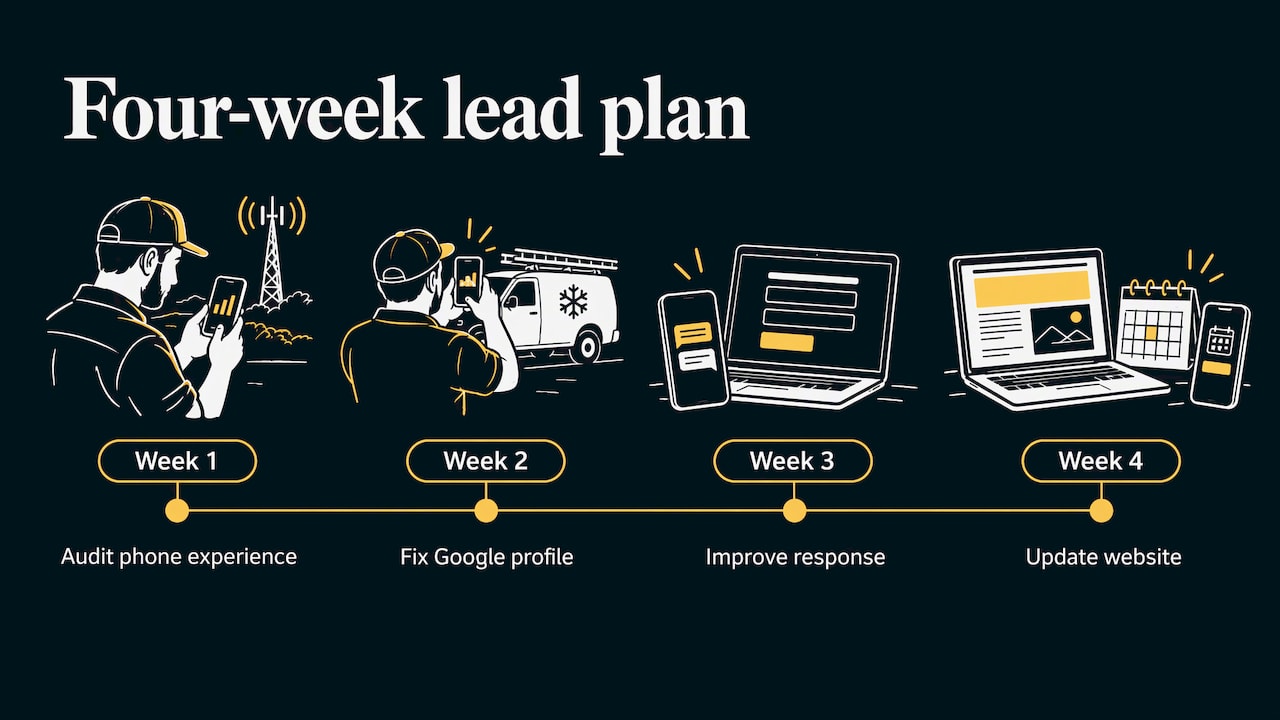
Week 1: Audit your phone experience. Pull up your site on your own phone, on cell data, not Wi-Fi. Time the load. Find your phone number. Try to request service. Write down every point where you'd give up.
Week 2: Fix the profile. Check your primary category, hours, service area and photos. Send review requests to your last 20 customers. No incentives.
Week 3: Fix response. Set call forwarding and missed-call text-back. Decide who checks forms and how fast.
Week 4: Fix the site. Add or rebuild service pages and city pages, put a tap-to-call button on every screen and add a booking option. For ideas on the wider picture, read our plain playbook on getting HVAC customers.
To see how this looks in Southern California, see our HVAC page for LA and the Inland Empire.
Get a site that catches the leads
Here's what we do. We build mobile-first custom websites for service businesses, set up and manage Google Business Profiles, handle local SEO and AI search, and offer optional monthly care plans for site updates. You get a free live demo within 24 hours, pricing agreed before you commit, no long-term contract, direct access to the builder and ownership of your site assets.

See our pricing and plans or look at sites we've built first to see how a trade site looks on a phone.
FAQ
How do I get HVAC leads without buying them?
Build the three things you own: a phone-first website, a complete Google Business Profile with steady reviews, and a fast way to answer calls and forms. Add referrals and repeat customers on top. These keep producing without a fee per lead.
Should I add online booking to my HVAC site?
Yes, if you can handle the requests quickly. A scan of 1,363 HVAC sites found 30.4% could take online bookings, so a working booking option sets you apart. Keep it short: problem, address, time window.
How many reviews do I need to show up on Google?
There's no magic number. Google weighs relevance, distance and prominence, and reviews feed prominence. Ask after every job, reply to each one and keep them recent, since shoppers look for reviews from the last three months.
Does my website need to be built for phones first?
Yes. Most local searchers are on a phone and expect a quick load and a one-tap call. We design phone-first for that reason, and we show you a live demo of your site in 24 hours.
Sources
- The Ultimate Guide for HVAC Leads Generation
- How to Get HVAC Leads in 2026: 12 Low-Cost Ideas
- HVAC PPC Guide: How to Get More Leads with Paid Ads
- Improving Your HVAC Website's User Experience (ACHR News)
- Google PPC Can Improve Your HVAC Marketing Strategy (ACHR News)
- We scanned 4,550 US home-services websites
- 12 Google Business Profile Optimization Tips
- How to Get HVAC Leads: US Guide 2026
Get a free live demo of your new site in 24 hours at nocturne.design.