
A solar company website has one job: get a homeowner to request a quote before they call the next installer. That takes a fast phone-first site, honest pricing answers, a short form and proof you work in their town. We build these sites for service trades, and we show you a live demo of yours in 24 hours. Built first, paid after.
Below is what the site needs, page by page, and where most installer sites lose the lead.
TL;DR
- Build for the phone first. Most solar shoppers research on a mobile device, and slow pages lose them.
- Answer cost, incentives and payback on the page, with dates on every figure.
- Keep the quote form short and put a call button next to it.
- Make a page for every city you serve, using real jobs, not copy-paste text.
- Get a free live demo from us before you pay anything.
Table of Contents
- What a solar website has to do
- The pages you need
- Mobile first is not optional
- Turning visitors into quote requests
- Show up when homeowners search nearby
- Your team page is a sales page
- A quick pre-launch checklist
- Promo: see your site before you pay
- Perspective
- FAQ
- Sources
What a solar website has to do
A homeowner looking at solar is about to spend a lot of money. Bold Energy puts 2026 residential pricing at roughly $2.50 to $3.50 per watt before incentives, or about $18,000 to $31,500 for a typical 7 to 9 kW system. Nobody spends that off one glance at a site.
So the site does three things:
- Proves you are a real local company.
- Answers the money questions without a sales call.
- Makes the next step easy on a phone.
Miss any of the three and the visitor goes back to the search results. That is a missed job you paid nothing to lose and everything to want.
The pages you need
Keep the structure simple. Every page answers one question and offers one next step.
| Page | What it answers | Next step |
|---|---|---|
| Home | Who you are, where you work, what you install | Quote button and phone number |
| Residential solar | How a home install works start to finish | Quote form |
| Battery storage | What a battery does and when it pays off | Quote form |
| Commercial solar | What a business gets and how financing works | Call or form |
| Pricing and financing | Cost ranges, loans, leases, PPAs | Quote form |
| Incentives | What credits and rebates apply now | Quote form |
| City pages | Your work in that city | Quote form |
| Projects and reviews | Real jobs, real owners | Quote form |
| About | Your crew, licenses, years in business | Call |
That covers a site that can sell. Add pages only when you have something real to put on them.
Pricing and incentives: state them right
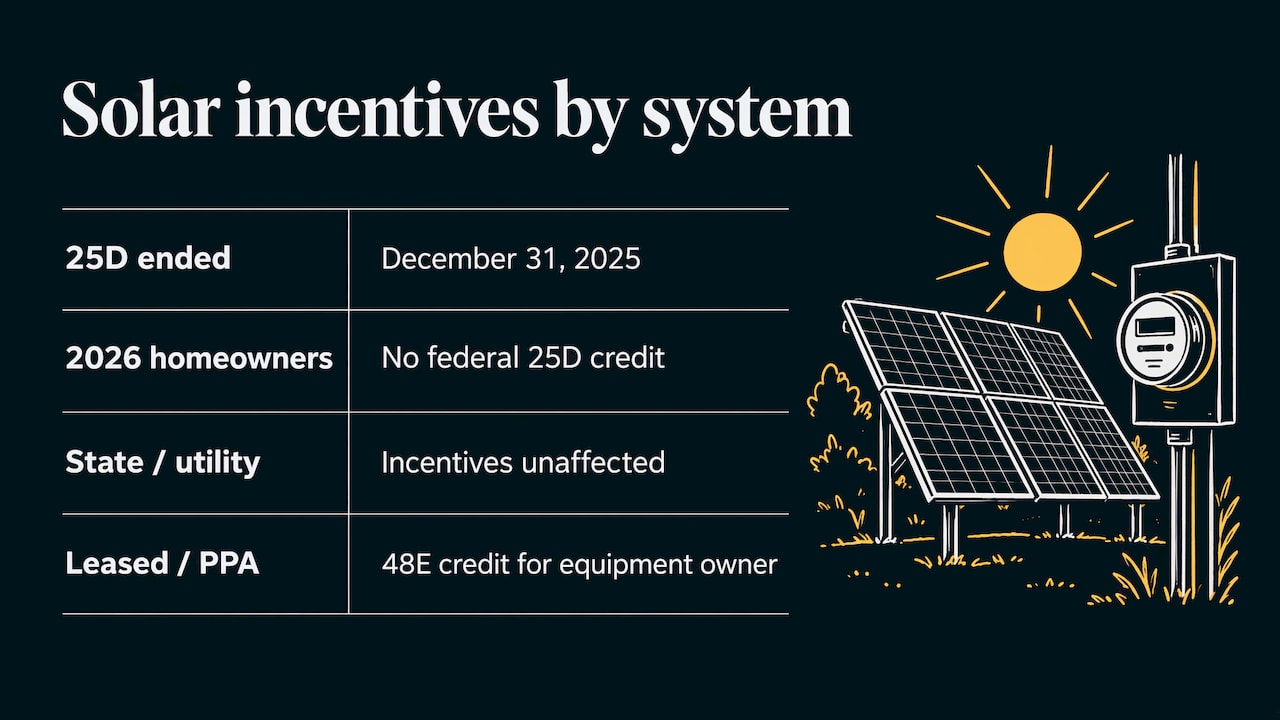
This is where solar sites get in trouble. The rules changed. Bold Energy notes the federal residential solar tax credit, Section 25D, ended December 31, 2025, so homeowner systems installed in 2026 do not qualify. State and utility incentives were not affected. Leased and power purchase agreement systems can still earn the Section 48E credit for the equipment owner.
If your site still pushes the old 30% credit, you are handing homeowners wrong math. Date every figure on the page. Link incentive claims to the official program page. Review the page every quarter. Rules move, and your site should move with them.
A short plain-English line helps: a power purchase agreement (PPA) means a company owns the panels and you pay for the power they make. Explain terms like that once, right where they show up.
Show what a good quote contains
Homeowners get quotes that are hard to compare. Help them. A page that explains what a quote should list builds trust fast. According to Bold Energy, a solid quote names the system size in kW, the exact panel and inverter models, annual production assumptions, current usage from the customer's bills, each incentive applied, the net metering arrangement, separate warranties and the payback math with its rate-increase assumption.
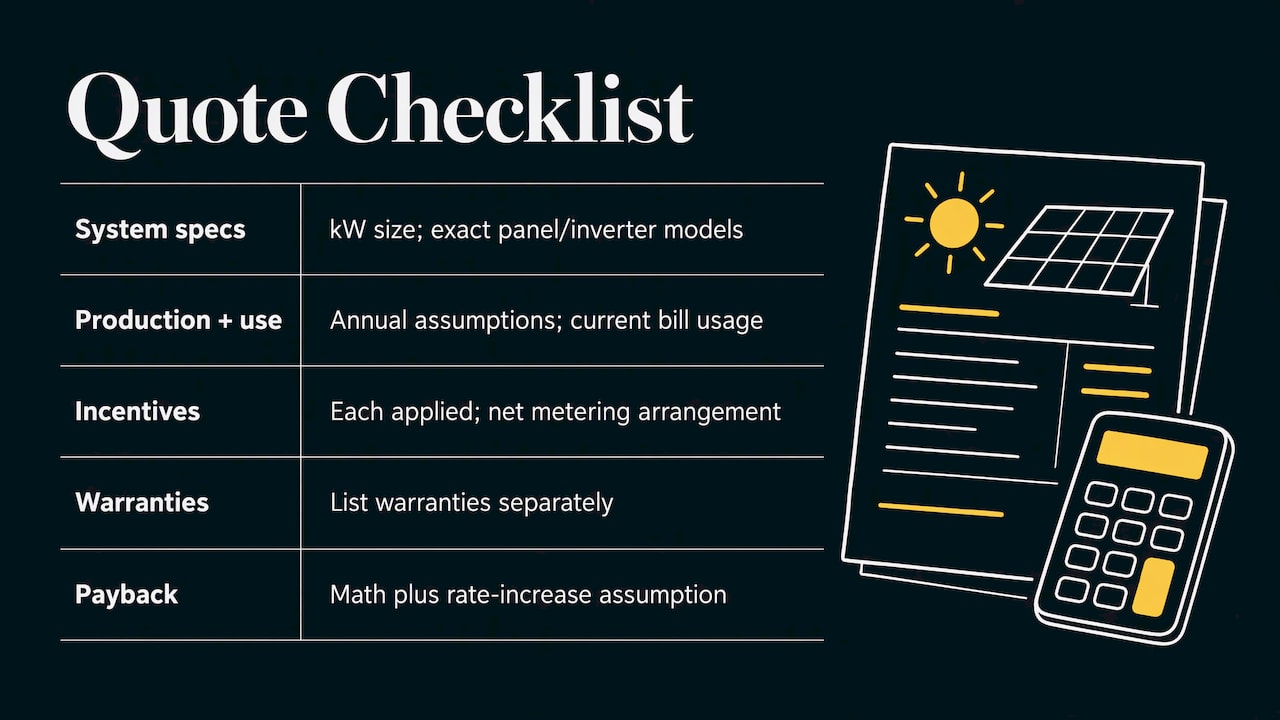
Put that checklist on your site and make sure your own quotes match it. You look like the straight shooter in the market.
City pages that are not copy-paste
You probably serve more than one city. Each one deserves its own page. Google's local results lean on relevance, distance and prominence, and a page about the city someone searched for helps with relevance.
A Southern California example, made up for illustration: a crew in the Inland Empire could write one page for Rancho Cucamonga and another for Riverside. Each would name the local utility, the typical roof types in those neighborhoods, the permit office that handles the job and a few finished installs. That beats swapping the city name on the same paragraph twelve times.
Collect the facts before the crew leaves the job: address area, system size, roof type, utility, permit timeline. Photos too. That gives you real material for every page. Our guides on service area business SEO and local SEO for contractors walk through the same routine for any trade.
Mobile first is not optional
People search for installers on their phones. Often they are standing in the driveway looking at the roof, or on the couch with a power bill open. If your site works only at a desk, you built it for yourself.
Speed
Google's Core Web Vitals guidance says the main content of a page should show up within 2.5 seconds of when loading starts, measured for most visitors. That is the benchmark to aim for.
What slows solar sites down, in our experience building trade sites:
- Huge roof photos uploaded straight from a camera.
- Auto-playing background video.
- Stacks of plug-ins and widgets.
- Slider galleries nobody scrolls.
Compress the images. Cut what does not earn its place. Keep the first screen light.
Thumb-friendly layout
Simple rules:
- Put a tap-to-call button at the top and keep it visible as the visitor scrolls.
- Make buttons big enough to hit without zooming.
- Use a menu with six items or fewer.
- Write short paragraphs with plain headings.
- Put the quote button after every major section.
Then pick up your own phone and try to request a quote with one thumb. If you get annoyed, so will a homeowner.
Turning visitors into quote requests
Traffic means nothing if nobody asks for a quote. Here is what moves visitors to act.
A short form
Ask for less. One solar landing page guide from Ping Tree Systems recommends five fields or fewer: name, email, phone, ZIP and monthly bill range. We agree with the principle. Every extra field is one more reason to quit on a small screen.
Use button text that says what happens next, such as "See my estimated savings," instead of "Submit."
One clear action per page
Do not make a visitor choose between a form, a chat box, a phone number, a calculator and a newsletter. Pick the main action. Put a call button next to it for people who would rather talk.
Proof near the button
Put your license number, certifications and real reviews close to the form. Tell the visitor what happens after they send it and how fast you reply. Then reply that fast.
Real reviews and real jobs
Only use reviews that real customers wrote. Never make them up. Specific reviews that mention the permit timeline, the crew, the roof work and the service after install carry more weight than a one-line five-star. Ask for them at a steady point, for example after the system is turned on and after the first full bill.
Be careful about what you promise, too. Solar sellers have drawn lawsuits from state attorneys general over deceptive sales tactics. Clear numbers and plain terms on your site protect you.
Show up when homeowners search nearby
Your site is one half. Your Google Business Profile is the other. Homeowners searching "solar installer near me" see a map with three listings first. If you are not there, your site gets fewer chances.
Keep the basics tight:
- The business name, address area, hours and phone match everywhere.
- Pick the most accurate category.
- List your services and service areas.
- Add job photos on a regular schedule.
- Reply to every review, good or bad, in a calm, professional tone.
We cover the setup in Google Business Profile for contractors, and the same logic applies to solar. For the bigger picture of how searches turn into calls, read local SEO leads for service businesses. If you are weighing how a roofing-adjacent trade presents itself online, our roofing website design guide shows the layout choices in detail.
People also ask AI tools who the best installer in their city is. Clear service pages, accurate business details and plain answers to common questions help you get picked up there too. That is the work behind AI search optimization.
Your team page is a sales page
Homeowners let strangers on their roof. Show them who is coming. Put real crew photos, license details and how long you have worked in your area on the About page. If you are growing the crew, this installer recruitment guide covers how trades find and hire technicians, and a strong team page helps there as well.
A quick pre-launch checklist
Before the site goes live, run this list:
- Does the first screen on a phone show what you do, where, and how to reach you?
- Does the page load fast on cellular, not just office Wi-Fi?
- Is every incentive claim dated and linked to the official program page?
- Is the form five fields or fewer?
- Is there a tap-to-call button?
- Does each city page have real project details?
- Do your name, address and phone match your Google profile?
- Does a reply go out the same day someone submits?
Promo: see your site before you pay
Most agencies ask you to sign first and wait weeks. We flip it. We build a free live demo of your site in 24 hours, so you see it on your phone before you commit. All pricing is agreed up front, there is no long-term contract and you own your site assets. You also talk directly to the person building it.

We build mobile-first custom websites, set up and manage Google Business Profiles, handle Google local SEO and AI search, and can make scroll-driven showcase videos. After launch, optional care plans keep the site updated: Keep is $297 per month, Grow is $397 per month and Signature is $597 per month. See the details on our pricing page, or look at what we do on a website build. To see how we present local trades, browse our work, including a remodeling and ADU builder concept in San Dimas.
Perspective
We build sites for people who get paid when the phone rings. Solar is the same game as plumbing or roofing. A homeowner has a problem, searches on a phone and calls whoever looks real and answers first.
Most contractor sites lose that call in the first ten seconds. Slow load, tiny buttons, a form that wants twelve fields. The owner never sees it happen. That is why we show you the site first. You look at it on your own phone, in your own hands, before you spend a dollar.
Solar adds one more rule: tell the truth about money. Incentives changed, and homeowners know it. A site that states the numbers plainly and dates them earns the call. A site that hides them earns a back button.
Our approach is simple. Phone-first design, clear pricing, no contract, direct access to the builder. Built first, paid after.
M Mo
FAQ
How many pages does a solar company website need?
Start with a home page, one page per main service, a pricing and financing page, an incentives page, city pages for the areas you serve, a projects and reviews page and an About page. That is enough to answer the common questions. Add more only when you have real material for them.
Should I show solar prices on my website?
Show ranges and explain what moves them: system size, roof, equipment, financing type and incentives. Homeowners already see published cost ranges elsewhere, such as Bold Energy's per-watt figures, and a vague page looks evasive. Date every number and say it is a range, not a quote.
How fast should my site load on a phone?
Google's guidance is for the main content to appear within 2.5 seconds for most visitors. Compress images, drop heavy video on the first screen and keep plug-ins to a minimum.
How long does it take to get a solar website live with Nocturne?
You get a free live demo of your site within 24 hours, before you commit. Pricing is agreed in advance and there is no long-term contract. Details are on our pricing page.
Sources
- Solar FAQs: Cost, Financing, Batteries, Bold Energy
- Web Vitals, web.dev
- How Landing Pages Drive Solar Lead Generation, Ping Tree Systems
Ready to see it? Get a free live demo of your new site in 24 hours at nocturne.design.